8-PAGE GUIDE
See it, then make it.
Illustrated preparation and assembly steps for Meadow Daisy, with matching part labels, shaping instructions, and glue positions.

A little paper sunshine. A flower to keep.
No reviews yetMake a layered paper daisy with ivory petals, a golden center, and optional green leaves. This digital flower template includes full-size A4 and US Letter PDFs, SVG cutting files, and an illustrated assembly guide.
Two softly shaped petal layers nest together around a simple yellow center. Add the optional leaves for a botanical finish, or keep the bloom on its own as a flat-back embellishment for a handmade card or gift.
Cut two joined petal layers and one center, then add two optional leaves. Center the upper layer over the lower and rotate it by 22.5 degrees before attaching the center. The guide shows each glue zone and leaf tab.
Each print edition has two full-size cutting pages. The four SVG files contain two petal layers, a center, and a pair of optional leaves. No score operations are required.
Target bloom width excludes the optional leaves and has not been measured on a physical sample.
Paper weights are suggested starting points for testing. Paper, tools, glue, and finished flowers are not included.
Choose the A4 or US Letter edition and print at 100% / Actual Size. Turn off Fit to Page and check every 50 mm calibration line. Placement maps are assembly aids, not cutting sheets.
SVGs contain their full stated quantities. Check dimensions before arranging the pieces. Compatibility with Cricut Design Space, Silhouette Studio, and other cutting apps has not been verified.
After checkout, Gumroad opens your purchased content with the ZIP download. Your receipt also includes a download link. No Craft Patterns account is needed.
Personal use and handmade gifts are permitted. Commercial production and sale of finished items are not included. Digital files may not be shared, resold or redistributed.
Get the free ZIP through Gumroad. A download link is also sent to your email.
A little paper.
Beautiful possibilities.
See each step.
Picture-led instructions.
Your way to make.
Printable PDF + SVG.
FROM A FLAT SHEET TO SOMETHING LOVELY
Two softly shaped petal layers nest together around a simple yellow center. Add the optional leaves for a botanical finish, or keep the bloom on its own as a flat-back embellishment for a handmade card or gift.
Cut two joined petal layers and one center, then add two optional leaves. Center the upper layer over the lower and rotate it by 22.5 degrees before attaching the center. The guide shows each glue zone and leaf tab.
Gather your materials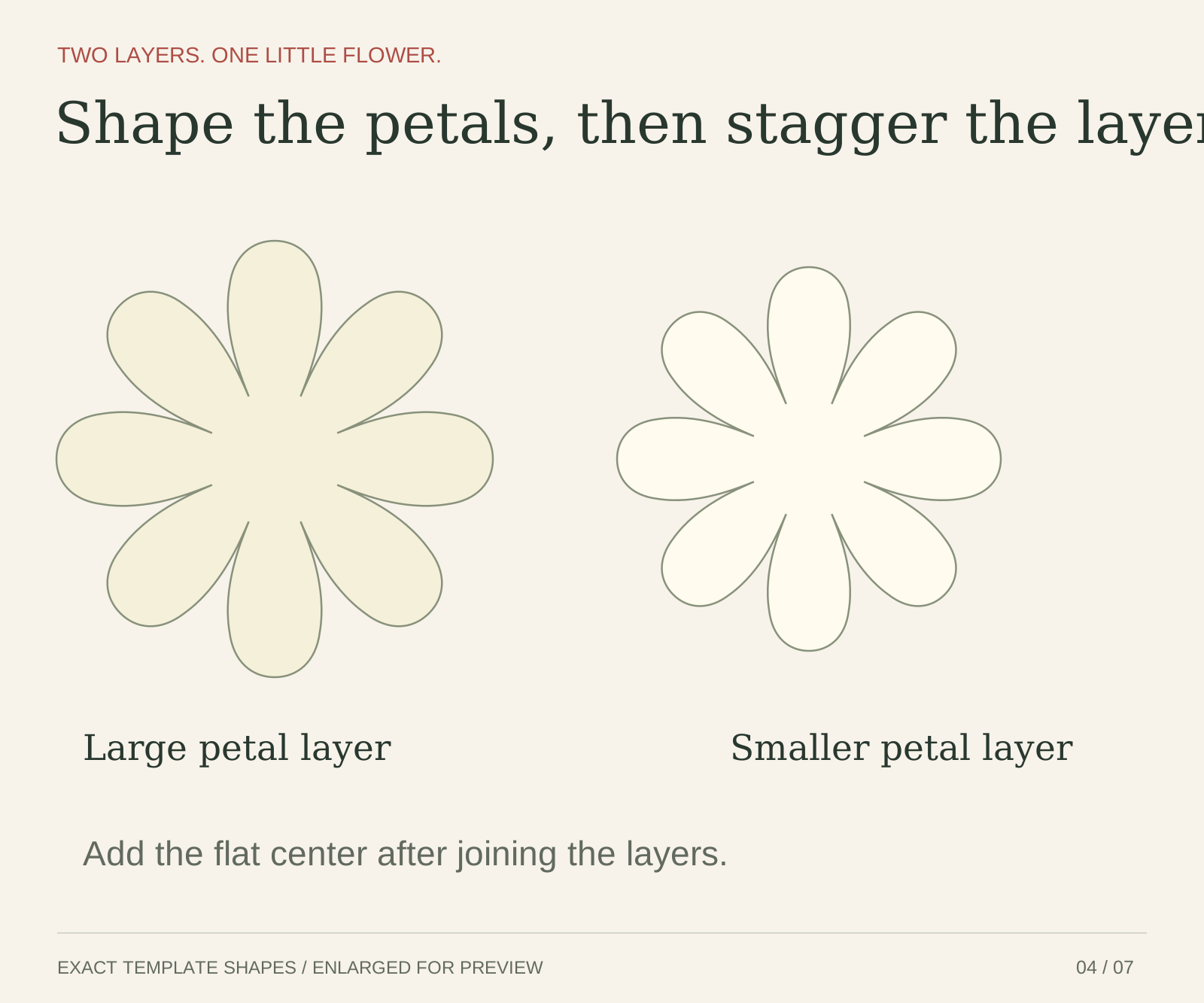
OPEN. CHOOSE. START MAKING.
The cutting outlines, the instructions, and the details that bring them together.
8-PAGE GUIDE
Illustrated preparation and assembly steps for Meadow Daisy, with matching part labels, shaping instructions, and glue positions.
2 PAGES PER EDITION
Full-size cutting outlines in A4 and US Letter editions, with 50 mm calibration checks. Choose the format that matches your paper.
4 CUTTING FILES
Vector outlines with the stated quantities included. Verify dimensions when importing; machine-specific compatibility is still untested.
One-page Start Here PDF · SVG files supplied together in MACHINE_FILES.zip
Each print edition has two full-size cutting pages. The four SVG files contain two petal layers, a center, and a pair of optional leaves. No score operations are required.
THE DETAILS THAT MATTER
Check the pieces and dimensions before choosing your paper.
| Part or layout | Size |
|---|---|
| Lower petal layer | 116 × 116 mm |
| Upper petal layer | 102 × 102 mm |
| Center | 24 mm diameter |
| Optional leaves | 24 × 50 mm each |
| Target bloom | 100–120 mm wide |
Target bloom width excludes the optional leaves and has not been measured on a physical sample.
YOUR LITTLE MAKING KIT
Suggested starting materials, awaiting a physical trial. Screen colors are approximate; choose paper shades you love.
BEFORE YOUR FIRST CUT
This is a digital PDF and SVG template package. You will make the project using your own paper and tools. No finished flowers, materials, or tools are shipped.
No. The printable A4 and US Letter templates provide a hand-cutting route. Use a PDF reader, print at Actual Size, and check the 50 mm calibration. SVG files provide another route for compatible cutting software, but specific machine imports and cutting settings have not been tested.
Cut two joined petal layers and one center, then add two optional leaves. Center the upper layer over the lower and rotate it by 22.5 degrees before attaching the center. The guide shows each glue zone and leaf tab. Target bloom width excludes the optional leaves and has not been measured on a physical sample.
After checkout, Gumroad opens the ZIP download and sends a download link by email. No Craft Patterns account is needed.
The digital templates and layouts have been checked. Printing, real-paper assembly, and machine-specific imports and cuts remain untested. The first image is a styled design reference, not a photograph of a sample made from these exact files.
Personal use and handmade gifts are permitted. Commercial production and sale of finished items are not included. Digital files may not be shared, resold or redistributed.
FROM THE MAKING COMMUNITY
There are no customer reviews for this template yet. Once it’s available, this will be a place for makers to share their experience and finished work.
KEEP YOUR CURIOSITY GOING
 Explore the pattern
Paper craft template
 Explore the pattern
Paper craft template
 Explore the pattern
Paper craft template
 Explore the pattern
Paper craft template